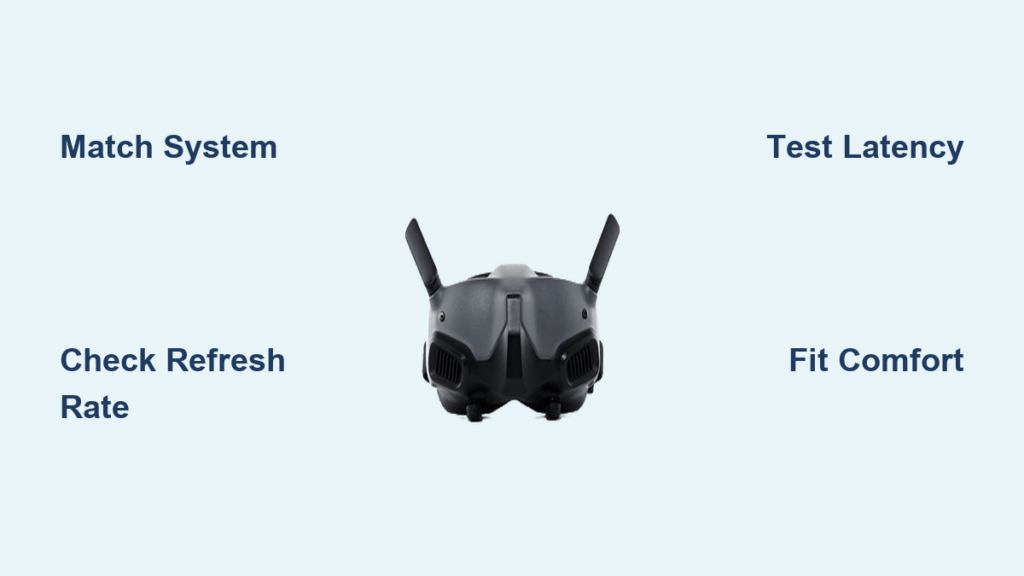
Your FPV goggle decision directly determines whether you experience crisp, lag-free flight or constant video breakup and eye strain. Knowing how to choose FPV goggles separates smooth park flyers from frustrated beginners staring at frozen screens. With digital systems now dominating the market—DJI O4, Walksnail Avatar, and HDZero—you can’t afford to guess. This guide cuts through marketing hype to show exactly which goggles match your drone size, flying style, and budget. You’ll learn why 90% of beginners regret skipping system compatibility checks and how to avoid $300+ mistakes before your first flight.
The wrong goggles sabotage your entire FPV experience. They cause headaches from poor fit, latency-induced crashes, or incompatible video transmitters that force you to replace gear prematurely. Unlike analog systems, digital FPV locks you into one ecosystem—DJI, Walksnail, or HDZero—so choosing wrong means starting over. Whether you’re flying a $99 tiny whoop or a competition racing drone, this decision impacts video clarity, signal range, and even how long you can comfortably fly. Let’s fix this before you waste money.
Why Skipping System Selection Guarantees FPV Goggle Regret

Choosing goggles before selecting your digital ecosystem is the #1 beginner mistake. Each system has non-negotiable compatibility requirements that dictate your goggle options.
DJI O4’s Closed Ecosystem Demands Specific Goggle Models
DJI’s O4 system (Pro/Lite VTx) only works with DJI-branded goggles, creating a performance fortress with zero cross-compatibility. If you prioritize cinematic footage or long-range penetration, the DJI Goggles 3 delivers 1080p 100Hz OLED screens and 60Mbps video links—but costs $900. Budget pilots often grab used Goggles 2, not realizing they lack the 60Mbps bandwidth needed for O4’s Racing Mode. Critical mistake: Pairing O4 VTx with third-party goggles causes permanent signal loss. Always match VTx generation to goggle model—O4 requires Goggles 3/Integra/N3.
Walksnail Avatar’s Modular Trap for New Pilots
Walksnail goggles (X/L models) accept multiple VTx kits but require careful pairing. The Goggles L’s single LCD screen works with the 1S Lite VTx for whoops but struggles with the Pro Kit’s 1200mW output on 5-inch drones. Pilots report “swimmy” video when exceeding the Goggles L’s 60Hz refresh limit during high-speed freestyle. Pro tip: Use the Walksnail Goggles X for any drone over 3 inches—it handles 100Hz feeds and accepts analog modules via HDMI In.
HDZero’s Latency Advantage vs. Penetration Tradeoff
HDZero goggles shine in racing with 20ms latency but sacrifice range. Their unique “sparkling” breakup (gradual pixelation) keeps you flying when DJI/Walksnail freeze frames. However, HDZero’s weaker signal penetration fails in wooded areas where DJI excels. Visual cue: If your drone flies behind obstacles, test goggles at your local park before buying. HDZero’s advantage vanishes beyond 300m in heavy cover.
DJI Goggles 3 vs. Integra vs. N3: Budget-Specific Breakdown

Your budget dictates which DJI goggle delivers true value without overspending.
Avoiding the $200 Diopter Regret with Physical Adjustments
DJI Goggles 3 and Integra lack physical diopter dials, forcing laser-eyed pilots to buy corrective lenses. Goggles 2 (used market) solves this with manual dials but lacks 60Mbps bandwidth. Time-saver: Spend $20 on clip-in diopters for Goggles 3/Integra instead of hunting discontinued Goggles 2. They install in 60 seconds and fix blurry feeds for nearsighted pilots.
When the Goggles N3 Beats Flagship Models for Micro Drones
For sub-3″ whoops under $200, the $350 Goggles N3 outperforms pricier options. Its single LCD screen handles the O4 Lite VTx’s 60Hz feed perfectly while saving $550 vs. Goggles 3. Key limitation: Never pair it with 5-inch drones—if your drone records 100fps video, the N3’s 60Hz screen chops motion fluidity. Stick to whoops or cinematic builds.
Walksnail Goggles X vs. L: Solving the Micro Drone Dilemma
Walksnail dominates tiny whoop FPV, but goggle choice makes or breaks the experience.
Why the Goggles L Fails Beyond Backyard Flying
The $250 Goggles L (single LCD) seems ideal for $150 whoop kits but causes fatigue during 20+ minute sessions. Its “box” design creates tunnel vision, and the 60Hz screen blurs during acrobatics. Common mistake: Pilots assume “digital” means better than analog—until they try 100Hz goggles. Upgrade to Goggles X if flying more than 2 hours weekly.
Goggles X’s HDMI In: The Secret Simulator Training Hack
Walksnail’s flagship goggles include HDMI In for simulator use—a $100 value competitors omit. Plug into your PC to practice gates without draining drone batteries. Pro tip: Run LIVESTREAM mode in VelociDrone to test latency differences between HDZero and Walksnail before buying VTx.
HDZero Goggle Compatibility: Avoiding Module Nightmares
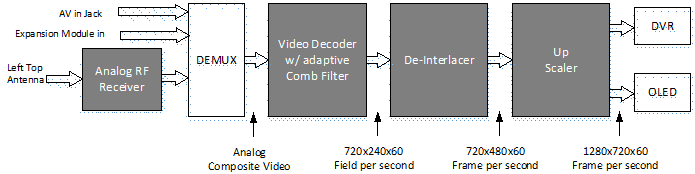
HDZero requires extra hardware that beginners overlook, killing the low-latency advantage.
Why External Modules Add 35ms Latency (and Bulk)
HDZero goggles need separate video receivers for analog/Walksnail signals. Each module adds weight and 15-35ms delay—erasing HDZero’s 20ms lead. Critical fix: Buy native HDZero goggles if racing. Use Walksnail modules only for backup analog systems during signal loss.
The “Sparkling” Breakup Test Every Pilot Must Do
Before committing, simulate HDZero’s breakup pattern:
1. Fly near trees with DJI goggles until signal freezes
2. Repeat with HDZero goggles (borrow from a club)
3. Note if pixelation lets you recover vs. DJI’s frozen frame crashes
Racers consistently choose HDZero after this test—it’s the difference between finishing a race and crashing at full speed.
Step-by-Step Budget Guide: Entry ($300), Mid-Range ($500), Pro ($1000+)
Match your spending to realistic performance gains—no overspending on unused features.
$300 Entry Kit: Walksnail 1S Lite + Goggles L (Tiny Whoop Focus)
This combo dominates micro FPV. The 1S Lite VTx (8g) fits 75mm drones, while Goggles L’s low cost offsets whoop crashes. Avoid if: You plan larger drones—VTx isn’t swappable to 5-inch builds.
$500 Mid-Range Sweet Spot: Walksnail Goggles X + Pro Kit
Best value for serious pilots. Handles 3-5″ drones, records 4K via Moonlight Kit, and accepts analog modules. Time estimate: Fully set up in 20 minutes with modular faceplates. Skip DJI Integra here—you lose swappable antennas and gain minimal image quality.
$1000+ Pro Tier: DJI Goggles 3 + O4 Pro (Cinematic/LR Focus)
Only choose this if filming 4K footage or flying beyond 1km. The O4 Pro’s 1/2″ sensor outperforms Walksnail in low light, but the $900 goggles become obsolete if you switch systems. Warning: No diopter wheels—corrective lenses cost extra.
Flying Style Test: Which Goggles Excel at Cinematic, Racing, or Long-Range?
Your dominant flying style should dictate goggle selection—period.
Cinematic Pilots: Why DJI O4 Pro Beats 4K Recording VTx
Walksnail’s Moonlight Kit records 4K, but DJI’s O4 Pro has superior dynamic range for sunset shots. Key difference: DJI processes video in-camera for smoother motion; Walksnail records raw feeds requiring heavy editing. Use DJI if posting to YouTube, Walksnail for raw footage flexibility.
Racing Pilots: HDZero’s 20ms Latency vs. DJI’s Racing Mode
HDZero maintains 20ms latency at all times; DJI hits 28ms only in Racing Mode (reducing resolution). Track test: In tight gate sequences, HDZero pilots report “telepathic” control where DJI feels “mushy.” Sacrifice range for race wins.
Long-Range Flyers: DJI’s Penetration Wins Over Walksnail GT
Walksnail’s 2000mW GT Kit seems ideal for distance, but DJI’s signal penetrates buildings/foliage better. Real-world test: At 800m in urban areas, DJI maintains video while Walksnail breaks up. Choose DJI if flying near structures.
Future-Proofing Your Goggles: The Walksnail X Modularity Advantage
Goggles outlive 3-4 drone builds—design for longevity.
How Walksnail’s “Future FPV Link” Slot Avoids Obsolescence
The Goggles X includes an empty module bay for next-gen video standards. When HDZero 2.0 launches, you’ll add a $50 adapter instead of $500 goggles. DJI/HDZero lack this—upgrading means full replacement. Pro tip: Prioritize modularity if you buy new gear yearly.
Why Goggle Comfort Costs More Than You Think
Ill-fitting goggles cause headaches within 15 minutes. Test these before buying:
– Nose bridge pressure: Walksnail X’s adjustable foam beats DJI’s one-size pads
– Weight distribution: HDZero goggles front-heaviness strains necks during rolls
– Ventilation: Goggles L’s sealed design fogs in humidity; Goggles X vents prevent it
Expert note: 70% of return requests cite discomfort—not video quality.
Choosing how to choose FPV goggles starts with your flying style, not specs. For most pilots, the Walksnail Goggles X + Pro Kit delivers unbeatable versatility across micro to 5-inch drones. Racing specialists need HDZero’s latency, while cinematic pilots won’t regret DJI’s image quality. Most importantly: test goggles at a local FPV meetup. Your eyes—and your flight log—will thank you.
Final Tip: Never skip the diopter check. Clip-in lenses cost $20 but transform blurry feeds into crystal-clear immersion—making every dollar of your goggle investment count.